Prompted, Not Proven – Part 2: The Last 30% is the Job
Prompted, Not Proven – Part 2: The Last 30% is the Job
This is Part 2 of the Prompted, Not Proven series in The Statement on what’s real, and what isn’t, in AI for finance content. If you missed Part 1, read it here: Most “AI for Finance” Content Has Never Met a Real Client.
In Part 1, I offered one test for every AI tip, template, and model in your feed: has the person sharing it ever put it in front of a real client? Most of the hype doesn’t pass.
Search YouTube or LinkedIn and you’ll find the same stories: one influencer has built an entire FP&A function with AI, another builds three-statement models in five minutes.
Do you believe them? Me neither. Because that’s just not how data and finance work. AI is extraordinary, but it can’t turn trash into something usable.
Part 1 also ended with two questions. This issue tackles the first one: if AI can produce deliverables that look 70-80% done, where does a professional – working hands-on – get involved? Is it only in that final stretch of customization?
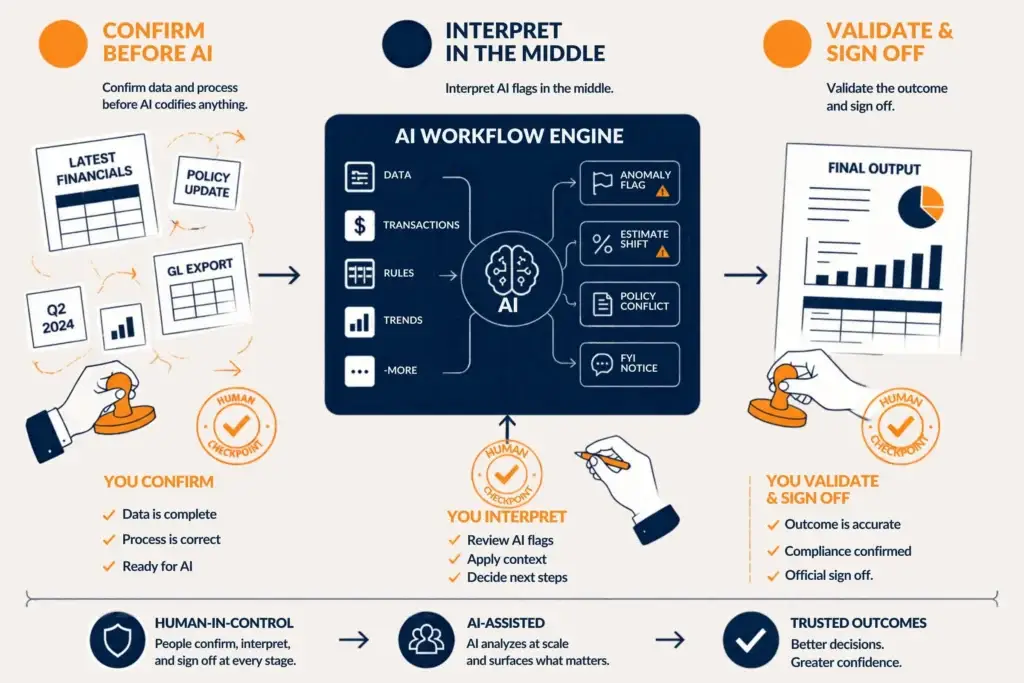
My short answer: no. The professional belongs at three points, not just the last one.
- Before AI codifies anything, to confirm the data and the process deserve to be repeated.
- In the middle, to decide what AI's flags actually mean.
- At the end, to validate and sign off.
The rest of this issue explains why, starting with news I didn’t plan to write about.
Meet Skill Recorder
For the past 11 months, most of my AI work in finance has focused on codifying skills, builds, and data management processes, largely in Claude and Copilot. So as a Microsoft insider who follows this space closely, I paid attention when the Excel blog announced a new capability on October 12th: Skill Recorder.
Rather than building AI skills from the ground up, we can now build them backwards. We can conduct our work the way we always do and Copilot watches. But it’s more than just recording the work – it’s assessing the full end-to-end chain of steps, codifying it, and making it reusable. Instead of building one skill at a time, we can now use AI to examine how all the skills and pieces fit together.
I still believe that it’s extremely important to understand the foundations from which AI skills, workflows, and agents are built. Without that understanding, we risk trusting AI to take our work from 0 to 100%. That’s a terrible idea. But now we can build forwards and backwards and be involved in whatever part of the process we think matters most.
Three Promises, Three Checkpoints
In the Skill Recorder announcement, Microsoft claims three new Copilot capabilities. These are claims, not results, and I haven’t tested them yet. Even if they work as promised, each one still needs a person to validate it.
1. Clean Data – Copilot looks for problems in your data, explains what it found, and recommends fixes before you start analyzing. This matters more because of Skill Recorder. If Copilot is going to watch your month-over-month process and run with it, you don’t want it codifying a process built on garbage data. Garbage in, garbage out. Having AI help clean the data before it codifies a repeatable process is paramount.
2. Learning the Processes – My concern with most of the hype I see online – that all you need to do is give good prompts and you’ll end up with good results – is that it’s misleading at best and catastrophic at worst. Prompts do nothing to understand the underlying processes upon which AI workflows and agents perform.
If a process is broken, AI is unlikely to tell you, let alone fix it. Unless, of course, you also explicitly instruct it to come up with process improvement suggestions. But even with that, how would it know the best version of your process that it doesn’t know anything about?
Copilot’s newest version won’t necessarily detect a broken process either. But it will pick up the repeatable steps behind our work and articulate what our process actually is. In most small and midsized companies, processes aren’t documented as SOPs. They live in people’s heads. Skill Recorder could turn that know-how into something reusable by the person in charge and everyone around them. That means better process consistency across teams, instead of critical knowledge living in one person’s brain.
3. Interactive Canvas – This one may sound like a contradiction after what I just said about prompts. Microsoft says prompts CAN now turn workbooks and models into polished, interactive experiences for executive reviews, project updates, and status reports.
If you’re skeptical, I understand. Claude and Copilot have produced decent presentations, but not truly client-ready ones. They get us 70-80% of the way and leave the most important part to us: buttoning it up and validating that it’s correct.
Together, these three point to something that is really quite profound. In my 20+ years of FP&A and consulting, I’ve usually been the one steering the end-to-end process, from data collection to process management to presentation. This new functionality suggests Copilot can now support every link in that chain.
The 70% is Getting Bigger
I’m not going to tell you that these features won’t work. I’d love for them to, because I’ve lost so many hours of my life scrubbing data and fixing formats before getting to the part of the job I was getting paid to do. If Copilot can save us this time and frustration, it means AI will do more of the lower-value work, and we can focus on the remaining 20-30% of critical analysis and thinking. Or go home early. I doubt we’ll see a 20-hour work week any time soon, so it’s more likely that we’ll see our job requirements change.
And it’s not just Excel. I’ve been frequently demoing non-Excel FP&A tools almost weekly, many of which are becoming AI-first or AI-native, as they like to say. A year ago, I was not impressed by the AI enablement. But now, many of these tools are also capable of end-to-end data flow, process, insight, and presentation. The improvement is happening across the whole FP&A domain.
So the 70% is growing. That doesn’t shrink the remaining 30%. It makes the 30%…THE JOB.
Where Human Judgment Still Lives
Even as AI improves, it’s still very unclear where the AI line ends and human judgment begins. There will always be the concern about potential issues, where AI makes suggestions or inferences but we don’t know whether they’re correct or not.
Some vendors are tackling this head-on. I recently spoke with a leader at an FP&A software company who said he’s yet to encounter the platform’s AI ever making a mistake, mainly because they’ve made their AI deterministic and not probabilistic. In other words, the AI only works within the objective data in the system, not probabilistically the way Claude and Copilot do. It also lets users vouch and drill down to see exactly where each result came from.
That solves accuracy, but it doesn’t solve context. A tool built to flag unusual items will flag a negative $48,000 in revenue. But it may not know whether that was a mistake or something more. The Controller who knows the business can clear the flag in seconds: it was a credit memo for the customer who sent back Q2’s shipment. These details live inside peoples’ conversations and know-how about the business, not necessarily in the data and processes.

Do we connect the FP&A software to Slack conversations and AI bots taking notes from Zoom meetings and telephone calls? Now I’m really getting ahead of myself. Flagging anomalies is the easy part. Deciding what a flag means takes someone closer to the business than the AI is.
The Process Piece is the Catch
Repeating a process that’s codified with AI is different from validating that the process is right in the first place. In a call I had with one of my mastermind participants, I predicted that AI-enabled ERPs may be able to partially (even largely) implement themselves in the coming years. The analysis of account mapping and data flows is something I believe AI will be able to handle.
But an ERP that AI built isn’t necessarily an ERP built correctly. If I record a month-end routine with a flaw in it, I’ve made that flaw repeatable. And AI may build assuming that routine was flawless.
Skill Recorder and other seemingly-thoughtful AI capabilities depend on processes we already trust. Someone has to decide that those processes are strong enough for AI to work with. Copilot can run them, but Copilot has never been burned by one the way we, mere mortals, have.
Before I Say More, I Must Test It
In Part 1, I said that what a feature does and how well it holds up in real finance work are two different questions. That applies to me too. I won’t call Skill Recorder, or any AI feature, a game-changer until I’ve put it through real work myself. And most of us can’t yet: Skill Recorder is only reaching Excel Insiders now, at the end of October.
I write this way because I want us to examine capability and truth together. It’s one thing to look at a promising technology and say “I see where this could be useful” and something completely different to actually say “this is truly useful and I’m actively using it for X, Y, and Z.”
Do I think we’ll see AI that acts even more like a Controller or FP&A leader with 20+ years of experience? Yes, I do. But better technology doesn’t mean we should take ourselves out of the loop or buy into every new feature. As the 70% grows, the professional’s job is the last 30%: deciding which inputs and processes deserve to be automated, interpreting what AI surfaces, and putting our name on the result.
Questions for You
- Where in your process would you trust AI to take over today, and where would you never hand it the keys?
- Has AI ever flagged something in your numbers that only you could explain? What did it miss?